Official website links end with .gov.sg
Overview
The Electronic Transactions Act (ETA) recognizes that electronic signatures have the same legal effect and validity as wet-ink signatures if specified conditions are met. This guide covers the two types of e-signatures, when to use each, and which approved tools are available to you.
What is the Electronic Transactions Act?
The Electronic Transactions Act (ETA) gives e-signatures the same legal standing as wet-ink signatures. It recognizes two types — Ordinary Electronic Signatures (OES) and Secure Electronic Signatures (SES). Both are legally valid but differentiated on the specific legal and technical requirements each type must meet.
The main difference: if an SES signature is ever disputed, the other party must prove it was tampered with or misused. With OES, the burden of proof works the other way. This stronger protection is why SES is reserved for high-risk or high-value transactions and should be used under exceptional and rare circumstances.
Note: Agencies with transactions that have specific legislative or regulatory requirements shall consult their legal or regulatory departments on the use of electronic signatures.
What are Ordinary Electronic Signatures (OES)?
In most cases, ordinary electronic signatures can directly replace wet-ink signatures. Wet-ink signatures should be retained only where required by legislation, foreign requirements, or exceptional operational considerations.
The form of OES adopted should reflect the risk level of the service or transaction. At minimum, every OES must capture the respondent's identity and intention in clear proximity — the signatory must be explicit in confirming who they are and what they are agreeing to.
| Identity | Intention | Explicit Consent |
|---|---|---|
| Who is signing? Make it clear — don't leave room for doubt about who the person is. | What are they agreeing to? State the purpose plainly, right next to where they give consent. | Make it clear that they confirm their information is accurate and agree to the purpose of the transaction. |
Note: Ensure both identity and intention are provided in clear proximity — don't bury the declaration in fine print or on a separate page.
The form of OES adopted should reflect the risk level of the transaction. Applying and documenting risk mitigation measures strengthens the OES and makes it more defensible if the signature is disputed.
- Identity verification: Signer logs in or submits via a verifiable identity (e.g. Singpass, official email, system login), with their name displayed as a non-editable field where possible.
- Secure transmission: Send and receive signed documents only through official government systems or email accounts.
- Audit trails: Keep a full audit trail including name, user ID, timestamp, form reference, checkbox status, and system metadata.
- Documentation: Keep a record of what steps were taken and why — this is what makes your OES defensible if challenged.
Examples of OES:
- Typing your name at the bottom of an email or form
- Clicking "I agree" or "I approve" in a system
- In-system approvals (e.g. approving a workflow in an internal system)
- Digitally drawn signature
- A checkbox ticked to indicate consent or acknowledgement
- Email/SMS OTP verification
- Form with Singpass login and Myinfo prefilled data
What are Secure Electronic Signatures (SES)?
SES should only be used in exceptional circumstances where the transaction demands a high level of authenticity and integrity, or where there are specific witnessing and documentation requirements — such as funding contracts, tenancy agreements, or statutory declarations.
If an SES signature is disputed, the burden of proof falls on the disputing party to demonstrate that it was tampered with or misused — the agency does not need to prove its validity. This legal presumption of authenticity is what makes SES appropriate for high-risk transactions.
Where SES is required, agencies may consider solutions such as Sign with Singpass, or a digital signature created by a certificate issued by an accredited Certification Authority or a public agency approved by the Minister to act as a certification authority.
Best Practices
- Records management: Maintain records of all signed transactions, as some records may need to be retained for an extended period.
- Legislative and regulatory requirements: If a transaction is subject to specific legislation or regulation, consult your legal or regulatory department before deciding which type of e-signature to use.
How to Determine When to Use OES vs SES?
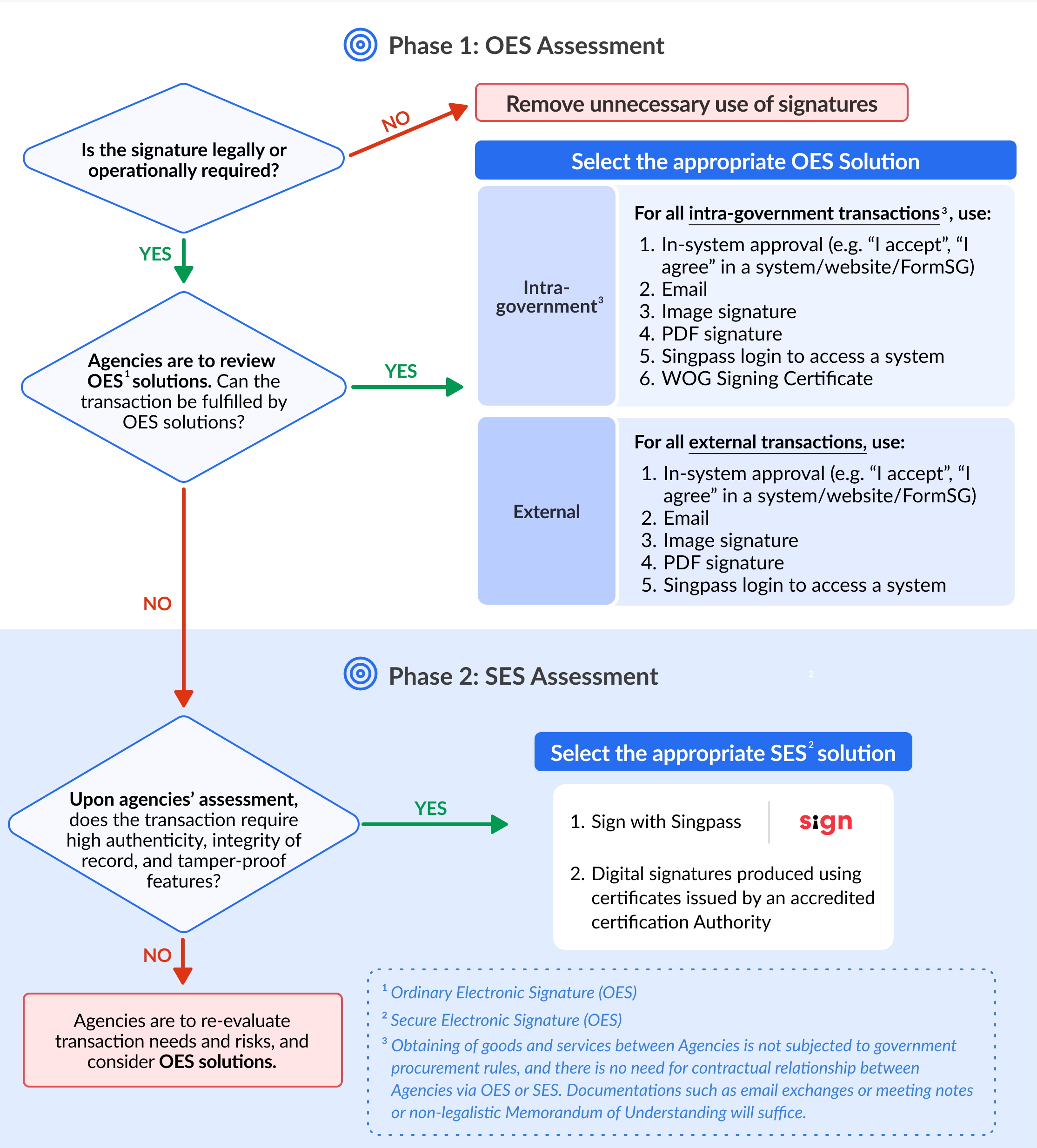
What E-Signature Tools Can You Use?
Government Tools
| OES | SES |
|---|---|
| FormSG DocCentral WOG Signing Certificate method (for officers with GSIB* computers) |
Sign with Singpass Signify (Sign with Singpass) DocCentral (Sign with Singpass) |
Non-Government Tools
| OES | SES |
|---|---|
| Adobe Sign Image signature method PDF signature method |
Netrust Digital signatures produced using certificates issued by an accredited certification authority |
Find more details about electronic signature solutions here.
Contact Information
For enquiries, email info@tech.gov.sg.
Was this article useful?